BetaSubtitle Room
Karaoke captions on your video and shorts from a long video
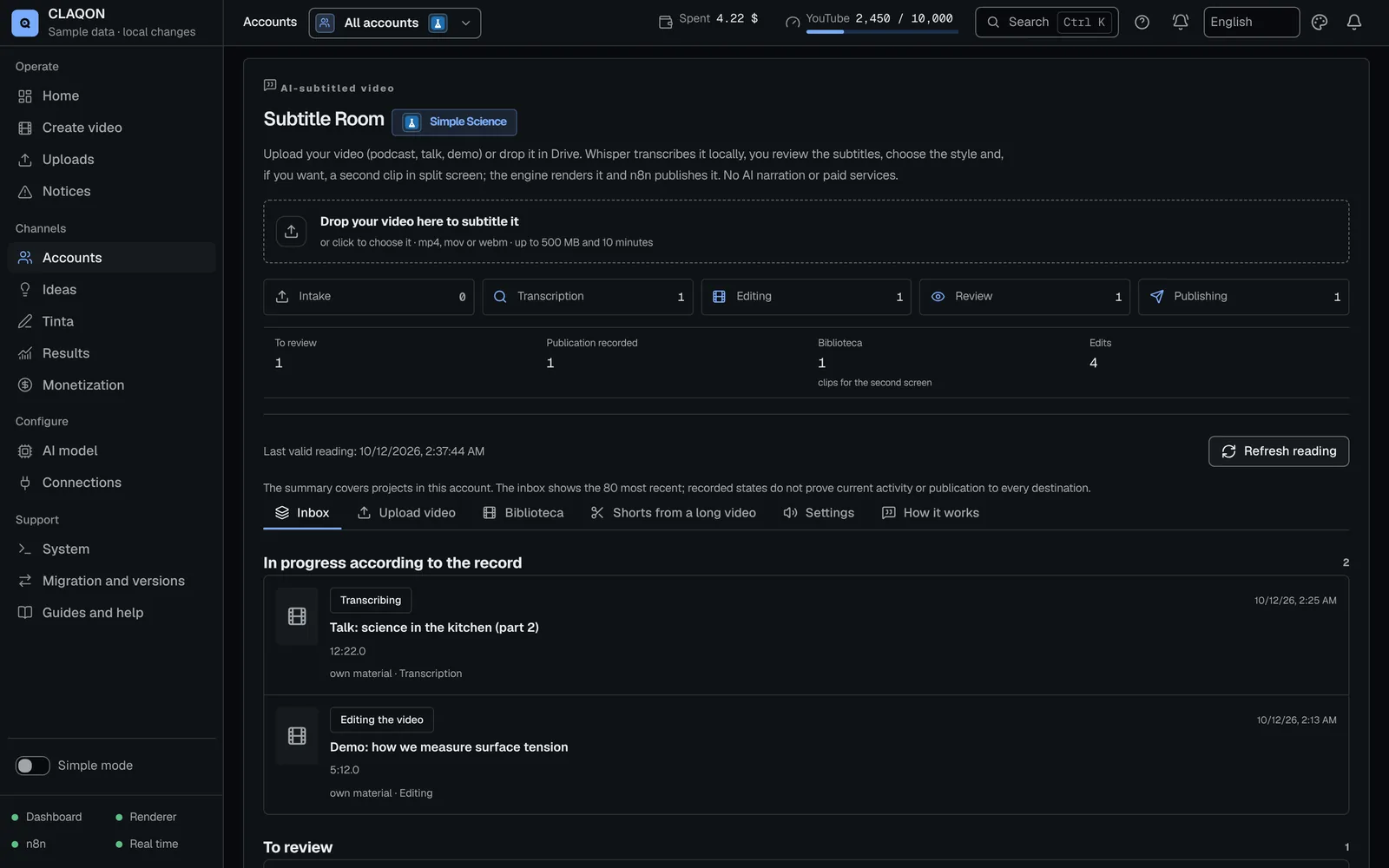
The Subtitle Room puts karaoke captions on your own video without paid AI services: it transcribes on your machine, burns in the captions with your account’s style and gets the video ready for publishing. Its “Shorts from a long video” tab cuts 3 to 10 vertical shorts from a long video of your own, and each one waits for your review.
- Local transcription, word by word
- 3 to 10 shorts per long video
- Every short waits in review
What it solves
Your footage, captioned and cut up on your own machine
A podcast, an interview or a recorded class is easier to follow with readable captions and in short pieces. Doing it by hand takes hours, and many cloud tools charge for transcription by the minute or in credits.
The Subtitle Room transcribes with Faster Whisper on your machine and renders the video with FFmpeg. “Shorts from a long video” uses that transcript to suggest the moments that stand on their own. You decide which ones go out.
How it works
How a video is captioned in the Subtitle Room
The video comes in
You upload it from the browser or drop it in the account’s Drive inbox.
It is transcribed on your machine
Faster Whisper extracts the text with the timing of every word, without calling any AI model.
Automatic first edit
Captions in phrases of up to 7 seconds or 14 words, burnt in with the account’s style. If you set it up, a second clip runs in split screen.
You review and adjust
You correct the text, cropping, position, audio and music, and render again. The preview is approximate: what counts is the FFmpeg render.
You approve and it is published
It goes out on the account’s active platforms with a note stating that the captions were generated automatically and reviewed. It is not flagged as synthetic content: the picture and the voice are yours.
Shorts from a long video
How it cuts shorts from a long video
Nothing starts on its own: the job begins when you ask for it, and the long video is not modified.
You choose the long video
One from the account’s library, uploaded or imported from Drive.
You set how many and how long
3 to 10 shorts, five by default, with a minimum length of 10 to 60 seconds and a maximum of 20 to 90.
The model proposes the moments
Your account’s AI model reads the transcript and picks moments that open with a hook and finish with an ending, each with an explained score out of 20.
Each short is edited
Vertical or zone-based reframing and dynamic captions. If the account has the AI director and you ask for it, a full edit.
You review each one
Each short waits in review as a Room project, unless you turn on its automatic approval.
Capabilities
What the Subtitle Room does, in detail
- Local transcription
- Faster Whisper, on your machine, with word-level timing. No AI model and no searches.
- Karaoke captions
- They highlight the word being spoken, with the account’s style. Every line of text can be corrected.
- Split screen
- A second clip above, below or to one side, with adjustable proportion, cropping and volume.
- Input from Drive
- With the Drive inbox deployed, a video with no rights record is registered as your own and, with automatic approval, is published without intervention.
- Library per account
- Video up to 500 MB and 20 minutes, images up to 25 MB and audio up to 120 MB and 60 minutes, with room for 400 items. It detects duplicates.
- Shorts from a long video Beta
- 3 to 10 shorts, with a minimum length of 10 to 60 seconds and a maximum of 20 to 90. One job in progress per account.
- Score out of 20
- Hook, ending, self-containment and value, from 0 to 5 each, with a sentence explaining each mark.
- Vertical reframing
- Fill the canvas, fit the video or give it a blurred background, or crop the account’s fixed zones.
- Editing with the AI director Off by default
- If the account has it, you can ask for the factory’s full edit for each short.
- Sound for social media Off by default
- Normalise loudness to −14 LUFS and reduce background noise, project by project.
- Automatic approval Off by default
- Separately for captions and for shorts. Without it, everything waits for your approval.
Limits
Limits worth knowing about
- “Shorts from a long video” is pending verification with real footage, and the Subtitle Room is still in beta.
- Rendering runs on the CPU, one at a time: a 20-minute podcast takes several minutes to transcribe and render.
- It does not reframe by following faces or the speaker: it fills, fits, blurs or crops fixed zones.
- Choosing the moments uses your account’s AI model: it costs whatever that model costs, or nothing per call if it is local.
- Shorts are not published on X until you confirm it, and no room publishes to TikTok.
- YouTube keeps videos uploaded through the API private until your Google project passes its audit.
- The Drive inbox workflows were validated without running them: their first real run is still to be checked.
- If the video is not yours, you need permission: the collapsible rights record blocks it if the proof is missing or has expired.
Frequently asked questions
Questions about captions and shorts
Do I need to pay for a transcription service?
No. Transcription is done by Faster Whisper on your machine, with the timing of every word, and the Room does not call any AI model or run any searches. Captioning spends nothing on paid services; it does use your machine’s CPU time.
How many shorts does it cut from a long video, and how does it choose them?
3 to 10, five by default. Your account’s AI model proposes moments that make sense without the rest of the video and scores them from 0 to 5 on hook, ending, self-containment and value, with one sentence per mark. The total out of 20 helps you choose; it does not predict the audience.
Are the shorts published automatically?
Not by default. Each short waits in review and is only approved automatically if you turn on automatic approval for shorts, which is off by default. X is off for shorts until you confirm it, and TikTok is not available.
Does it follow the person speaking when switching to vertical?
No. CLAQON does not recognise faces or speakers. You can fill the canvas, fit the video, give it a blurred background or crop fixed zones that you define in the account.
Can I caption someone else’s video?
Only with their permission. The Room assumes the video is yours; for someone else’s material you fill in the rights record, which blocks it if the proof is missing or has expired. To comment on other creators’ videos there is the Commentary Room.
Early access
Try the Subtitle Room with your own footage
Tell us what you record and in what format you publish. We will tell you whether the Subtitle Room and the shorts fit the way you work today.