Product
A control room for producing and publishing informational video at volume, with sound judgement.
CLAQON brings together in one installation what today is spread across several tools: source-based research, scripts with quality control, voice, editing, multi-platform publishing, analytics and spend control. It is installed on your machine or your server, and everything leaves a trail.
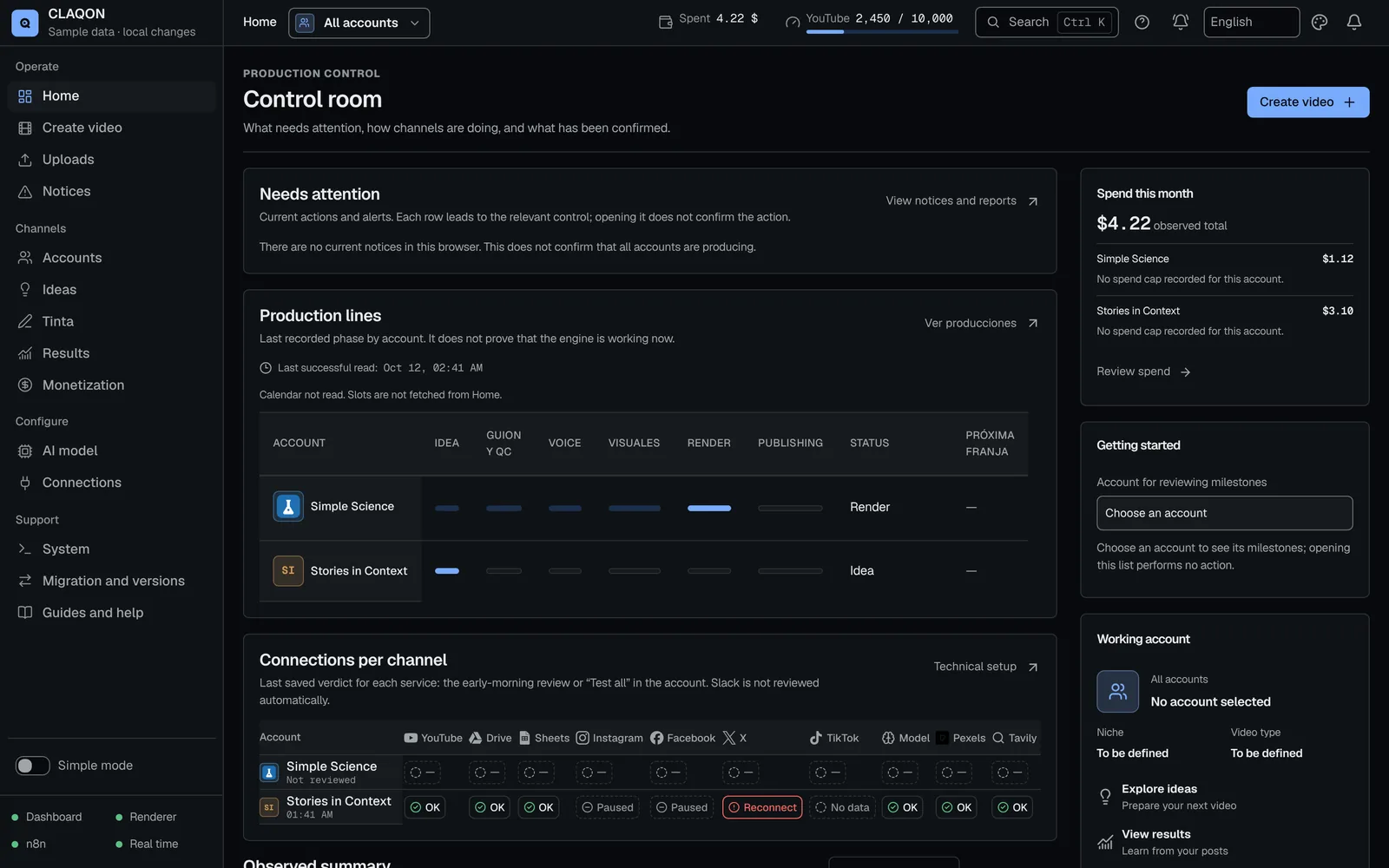
Tour
The dashboard at work, in under a minute
A real recording of the dashboard with sample data. Use the chapters to go straight to each part.
CLAQON dashboard tour0:33No sound
Tour chapters
- 0:00Home: accounts and production status
- 0:05Create video: topic, account and style
- 0:18Accounts: each channel’s profile
- 0:21Results and monthly spend
- 0:25Alerts and help
- 0:27Tinta: social posts
- 0:30Built-in guides
Architecture
What you install and where it runs
CLAQON is not a cloud service: it is a set of services that are installed on your machine or on a server in your name and managed from a local web panel.
- Web panel
- The control room: accounts, production, publishing, results, spend, connections and guides, in Spanish, English or Portuguese. It only listens on the machine itself unless you publish a protected access point.
- Production engine
- Edits the videos with FFmpeg, stores accounts, keys and logs, controls spending and talks to the platforms. One render at a time by default, on the CPU.
- Workflow orchestration
- Each account has its own dedicated workflow, with its webhook and its schedule. Workflows are generated and updated with reproducible tools, never by hand.
- Database and local search engine
- PostgreSQL for the Commentary Room and the Studio, and a local news search engine for trends, with no cost per query.
- Your providers
- The AI model, paid voice, images or AI video are contracted with your own keys. CLAQON does not resell credits or add a margin.
The workflow
Six phases, eighteen stages, a single log
Every piece follows the same path. The stages that cost money only run if the previous ones have passed their checks and the budget allows it.
Plan
The account takes the next idea from its queue, with its profile: niche, video type, format, length, market and language.
Research
Citable sources or your own. Only verbatim excerpts that are on topic and of valid length get through.
Write
The AI model writes; the deterministic HARD QC check requires 100/100 before moving on.
Produce
Voice with word-level timing, scenes, stock clips or AI if you enable it, and rendering with FFmpeg.
Publish
In its slot, on the account’s platforms. The format limits for X and Instagram are checked before uploading.
Learn
YouTube metrics, bounded learning and new ideas for the account’s queue.
Controls
What stops you from publishing something you should not
Verbatim evidence
A claim only gets into the script if its excerpt appears word for word in the source. Anything rejected cannot be cited.
Deterministic HARD QC
It rejects unsupported absolutes, figures that are not in the evidence, repeated scenes or unsupported titles. If it cannot be fixed, it goes to human review before anything is spent.
Budget gates
Before researching, writing, narrating and editing. If there is no budget, the piece takes the “low-cost exit” and the idea goes back to the queue.
Publishing barrier
A piece marked as a test is never published, and a stopped account blocks every publishing path.
Status of each feature
What is available and what is in beta
We would rather say it plainly. “Available” means implemented, covered by tests and in use by the CLAQON team itself. “Beta” means it works, but it has not yet been verified with real footage in production.
| Feature | Status | Notes |
|---|---|---|
| Shorts factory | Yes. Available | Automatic long-form video, in beta. |
| Verification and HARD QC | Yes. Available | New hook and original-thesis rules, pending deployment. |
| Spend control | Yes. Available | Single spend log and “Spend this month”, in beta. |
| Publishing to YouTube, Instagram, Facebook and X | Yes. Available | TikTok disabled. |
| Compliance record | Partial. Piecemeal | A single compliance record per piece does not exist yet. |
| AI models | Yes. Available | Ten preconfigured providers and a local model. |
| Analytics and learning | Yes. Available | Continuous improvement and trends, in beta. |
| Direct publishing and Simple mode | Beta Off by default | |
| Editing Studio | Beta | The tools added on 3 October are pending verification. |
| Captions and shorts | Beta | |
| Commentary Room | Beta Off by default | |
| Tinta | Beta Off by default | |
| AI characters | Beta Off by default | |
| Twitch and Kick clips | Beta Off by default |
Requirements
What you need to install it
Machine
- Windows 10 or 11, 64-bit, with Docker Desktop, or Debian or Ubuntu Linux with Docker (both installers in beta).
- Node.js 22.12 or later (version 24 LTS is recommended).
- At least 20 GB of free disk space, plus room for backups and videos.
- An Internet connection, and the machine switched on during production slots.
- A domain with HTTPS or a tunnel for the connections to the platforms.
Accounts and keys
- An AI model: a provider’s key or a local model.
- A free Pexels key for stock clips.
- Google for YouTube and Drive, with your own OAuth app.
- Meta for Instagram and Facebook; X, if you are going to publish there.
- Optional: source search, paid voice, image or video, Slack or Telegram.
Limits
What CLAQON does not do yet
- Publish to TikTok: disabled until the app has been audited.
- Multiple users with roles: there is a single login per installation.
- GPU or parallel rendering: it renders on the CPU, one video at a time.
- Public API or MCP: there are signed outbound webhooks, not an open API.
- Automatic face-based reframing, dubbing or voice cloning.
- Run without installing anything: it needs your machine or a server.
Questions
Questions about the product
Do I need to know how to code to use CLAQON?
Not to use it: you run it from the panel, with step-by-step guides and guided tours. Installing it means following a technical procedure (Docker, keys, connections); if you would rather not, there is the done-for-you setup.
What happens if a piece fails halfway through?
It stops before spending on the next stage and the panel explains the cause with the diagnosis. If an API failed, you can explicitly launch a new research run; an uncertain publication is never retried on its own.
Can I review the videos before they are published?
Yes. You can produce in draft mode, which edits without publishing, and publish a finished edit by hand. In direct publishing you can choose manual approval.
Which languages does it produce in?
Each account has its own content language and market. The narration follows the account’s language, and on YouTube it can upload captions translated into six languages in addition to the original. The interface is in Spanish, English and Portuguese.
Does it work with my own material?
Yes: you can bring your own sources, your narration (CLAQON aligns it with the script), your music and your videos for the Subtitle Room, shorts from a long video or direct publishing.
Next step
Tell us about your channels and we will tell you whether it fits
The early access programme has limited places because each installation is closely supported.