BetaEditing Studio
Editing Studio: an in-browser video editor that renders on your machine
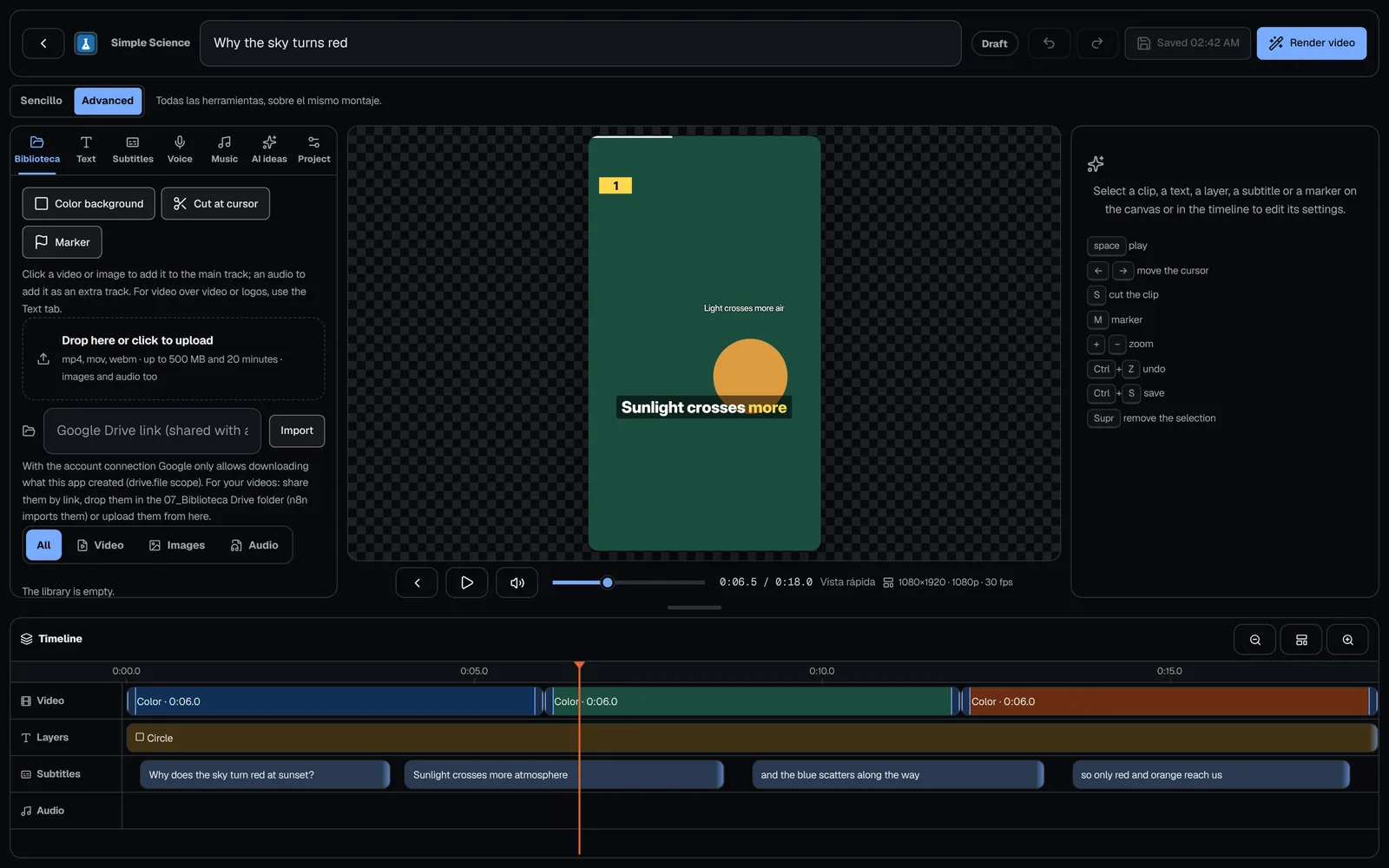
The CLAQON Editing Studio is a full-page video editor in your browser: a timeline with snapping, layers, 21 transitions, karaoke captions, voice and music. You edit from the panel and FFmpeg renders the final edit on your machine, with your footage in your library. It is in beta.
- No other editor to install
- Your footage, on your machine
- Also from your phone
What it solves
Touch up a video without leaving the panel or uploading it to another cloud
Between producing and publishing there is almost always a touch-up: an on-screen title, a cut, some captions to correct, a logo, a music track. Doing it in another tool means downloading, editing, exporting and uploading again, and often passing your footage through a third party’s cloud.
The Editing Studio lives inside CLAQON. It works with each account’s library, transcribes locally and renders with FFmpeg on your machine. For the basics it needs no paid service: AI ideas are optional and are requested one at a time.
How it works
From the library to the finished video
Gather the material
You upload video, images or audio to the account’s library, or import them from Drive. Duplicates are detected automatically.
Start the edit
From one of the 5 starter templates or from scratch, with a vertical, horizontal or square canvas.
Edit on the timeline
Clips, transitions, text and image layers, captions, voice and music, with an inspector, and undo and redo.
Resume whenever you want
It saves itself 2 seconds after each change and when you close it, and comes back with the playhead, the zoom and the tab where you left them.
Render on your machine
FFmpeg generates the video at 720p, 1080p or 4K. You review it and approve it for publishing.
Capabilities
What you can do in the Editing Studio
- Timeline
- With snapping to edges and markers, a contextual inspector, and undo and redo. Keyboard shortcuts to play, move and delete.
- Canvases and output
- Vertical, horizontal or square canvas. Output at 720p, 1080p or 4K, with normal, high or maximum quality and at 24, 25, 30, 50 or 60 fps.
- Clips and transitions
- 21 transitions: cut, fade and 19 xfade transitions. Speed from 0.25 to 4×, filters (brightness, contrast, saturation, blur, black and white, sepia and vignette), reverse of up to 30 seconds, end freeze frame, zoom, rotation, mirror and Ken Burns motion on images.
- Layers
- Text with 6 animations, image or logo, picture-in-picture (PiP) with chroma key, shapes, progress bar and split screen.
- Karaoke captions
- Manual, from SRT or through local transcription with Whisper. The word being spoken is highlighted, the style can be edited, uncertain words are underlined and you can “Realign”.
- Voice and music
- Narration with Piper, recording with the microphone and music that automatically drops under the voice (ducking), with up to 8 tracks.
- AI ideas on demand
- Titles, hook, captions, hashtags, structure and style, each suggestion applicable in one click, with a counter and a daily cap. With no AI model configured, the editor keeps working.
- Templates and fonts
- 5 starter templates and 11 built-in fonts, as well as those installed on the system. The preview uses the same typeface as the render.
- Limits of an edit
- Up to 20 minutes, 80 clips, 120 layers, 3,000 captions and 8 tracks.
- Library per account
- Video up to 500 MB and 20 minutes, images up to 25 MB and audio up to 120 MB and 60 minutes, with 400 items per account. It detects duplicates and imports from Drive.
- On your phone
- Below 760 px wide, the tools open in bottom sheets; on the timeline, one finger scrolls and two fingers zoom.
- Safe zones
- A guide you can show or hide in the preview, with an alert when you move the captions. The margins are approximate.
- Pauses and filler words Beta
- Suggestions on the timeline; you apply them one by one.
- Loudness and noise Off by default
- Normalisation to −14 LUFS for social platforms and noise reduction, per edit.
Limits
Limits of the Editing Studio
- The browser preview is approximate: what counts is the FFmpeg render.
- Reframing follows a region that you mark: it does not recognise faces or people.
- The engine renders one video at a time, on the CPU: a long edit can take several minutes.
- It does not remove the background without a chroma key.
- The account’s global music does not play in the preview; library tracks do.
- There is a single user per installation: there is no real-time collaborative editing.
Frequently asked questions
Questions about the Editing Studio
Do I need to install a separate video editor?
No. The Editing Studio opens in the browser, inside the CLAQON panel, and FFmpeg renders the final edit on the machine where CLAQON is installed.
Can I edit from my phone?
Yes, with your phone’s browser: below 760 px wide, the tools open in bottom sheets and the timeline is controlled with your fingers. There is no mobile app.
Can it be used without paid AI?
Yes. Transcription, captions, narration with Piper and rendering are local. AI ideas are optional, are requested one at a time and have a counter and a daily cap.
What resolution and frame rates does it support?
Output at 720p, 1080p or 4K, at 24, 25, 30, 50 or 60 fps, with normal, high or maximum quality. The canvas can be vertical, horizontal or square.
Does it automatically reframe on the person speaking?
No. Reframing follows a region that you mark on a frame, using texture correlation; it does not recognise faces. It is also one of the tools from 3 October that are pending verification with real footage.
Early access
Edit your videos without taking them off your machine
Tell us what you edit today and with which tools. We will tell you which part of your work the Editing Studio covers and which part it does not cover yet.