BetaTinta · social posts
Publish text and threads on eight social networks from your panel
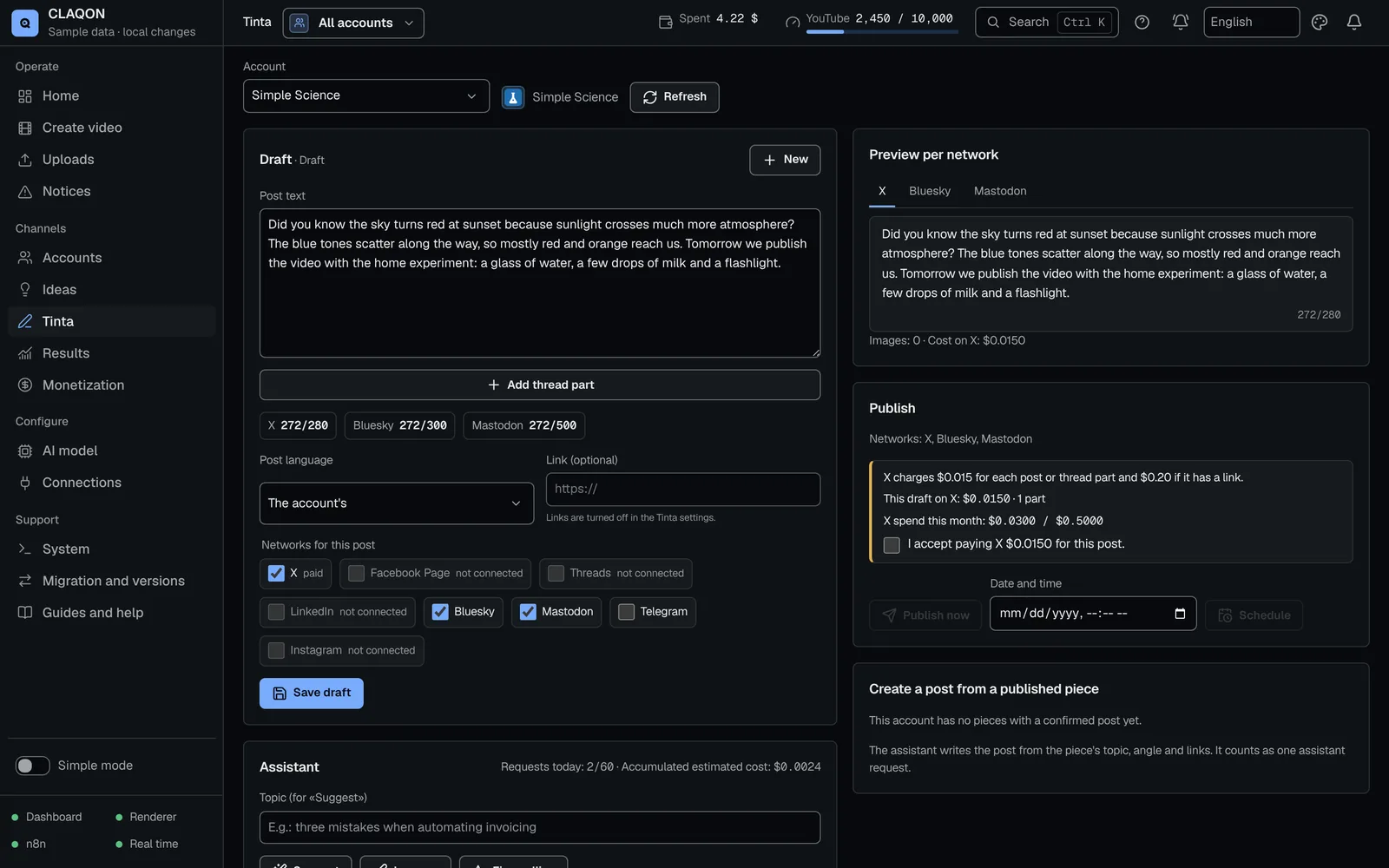
Tinta is the part of CLAQON that publishes text: posts and threads on Threads, LinkedIn, Bluesky, Mastodon, Telegram, X, Facebook and Instagram. You write or ask for a draft, see how much space it takes up on each network, add images with alt text and publish it, schedule it or create it from a piece that has already been published. It is in beta and off by default.
- A counter with each network’s limit
- Images with alt text
- X only with your confirmation
What it solves
One text, eight different limits
Each network counts text its own way: X weights links, Bluesky counts graphemes, Telegram allows less text when there is a photo and Instagram does not publish without an image. Adapting the same message by hand takes time, and it is easy to get it wrong.
Tinta prepares the draft for each network, splits it into a thread where the network allows it and stops it before sending if it does not fit. X, which charges for every post, always goes last and only with your confirmation.
Tinta’s text networks
- Threads
- Bluesky
- Mastodon
- Telegram
- X
How it works
How to publish a thread with Tinta
Turn on Tinta and connect the networks
Tinta is switched on per account. Threads and LinkedIn connect through their authorisation window; Bluesky, Mastodon and Telegram, with their details; Facebook and Instagram, with the Meta connection.
Write or ask for a draft
The assistant uses your account’s AI model to suggest, improve, correct, change the tone (neutral, formal or friendly), translate or propose images.
Check each network
The counter shows how much space the text takes up on each network and how the thread looks, with up to 25 parts. A light check stops whatever does not fit.
Add images
Up to 4 per draft, from Pexels or your library, each with its alt text and credit.
Publish, schedule or start from a piece
Publish now, choose a time or create the draft from a piece that has already been published. X goes out last and asks you to tick “I accept paying X” with its cost.
Check the result
The history shows what went out on each network. Anything left in doubt you reconcile with “It went out” or “It did not go out”.
Capabilities
Limits per network and Tinta features
| Network | Text | Thread support | Bear in mind |
|---|---|---|---|
| X | 280 characters; a link counts as 23 | Yes | Paid: confirmation for every post and a monthly cap |
| Threads | 500 characters | Yes | The image is served from a public address: it needs Google Drive |
| 3,000 characters | No | — | |
| Bluesky | 300 graphemes | Yes | Images up to 2 MB |
| Mastodon | 500, or your instance’s limit | Yes | — |
| Telegram | 4,096; 1,024 with a photo | No | — |
| 2,200 characters | No | Image required, served from Google Drive | |
| 63,206 characters | No | — |
Threads and LinkedIn need your own app on each platform.
- Draft editor
- Text, thread, images and target networks in a single draft, with a counter per network.
- AI assistant
- It suggests and improves with your account’s model, in the tone and language you ask for. You review every suggestion.
- Light quality control
- It stops empty texts, lengths that do not fit, threads that are too long, a required image that is missing and links that are not allowed. It warns about unclosed quotation marks or more than 5 hashtags.
- From a piece
- Creates a draft from a video that has already been published.
- X with confirmation
- An “I accept paying X” tick box on every post, X always last and its own monthly cap.
- Automatic queue by slots Off by default
- It publishes in the account’s text slots only if you turn it on. In automatic mode it also stops absolutes with no figure or source.
- Expiring connections
- Threads renews itself; LinkedIn warns you 7 days before it expires.
Limits
Limits worth knowing about
- Tinta is in beta, off on every account and pending verification with real material.
- Publishing on X requires a developer app with a paid API plan, and every post has a cost on X.
- Threads and Instagram need Google Drive connected for images.
- It does not collect metrics from the text networks: automatic analytics come from YouTube.
- It does not create LinkedIn carousels and does not publish to TikTok.
- An uncertain post is not retried on its own: you reconcile it.
Frequently asked questions
Questions about Tinta
Which networks does Tinta publish on?
Eight: Threads, LinkedIn, Bluesky, Mastodon, Telegram, X, Facebook and Instagram, each with its own counter and limits. For video there are multi-platform publishing and direct publishing.
Why does X ask for confirmation every time?
Because X charges for every post, and more if it includes a link. Tinta shows you the estimated cost, asks you to tick “I accept paying X”, publishes on X last, once it knows how the others went, and respects a monthly cap.
Can it write the texts for me?
The assistant suggests and improves drafts with the AI model you have chosen. You decide what is published: without the automatic queue, nothing goes out without your click.
Does it publish on its own?
Only if you turn on the automatic queue by text slots, which is off by default. By default, you publish or schedule each draft yourself.
What happens if I do not know whether a post went out?
It is marked as uncertain in the history. It is not repeated on its own, so as not to duplicate it: you check the network and mark “It went out” or “It did not go out”.
Early access
Take your posts to eight networks, under control
If you publish threads or posts as well as video, tell us on which networks. We will tell you what Tinta, which is still in beta, can do today.