Use case · Agencies and studios
Agencies and production studios: several channels in one installation, each one isolated.
If you run channels for clients or for your production company, CLAQON lets you operate several accounts in a single installation, each with its own profile, connections, budget and schedule. Before you read on, the important part: today there is a single user per installation, with no roles.
The challenge
Several clients, several brands and a single team
Each client has their own calendar, tone, platforms and budget. Mixing up keys, spending or posts between channels is a serious risk, and knowing how much it has cost to produce for each one requires a reliable log.
Many cloud tools charge per user and in credits, and your clients’ material ends up on third-party servers. If you would rather produce on infrastructure you control, you need each channel to be truly separate.
How CLAQON solves it
Separate accounts within the same installation
- One account per channel
- Each account has its own dedicated production workflow, with its own webhook and a staggered schedule so that they do not overlap. A guided 6-step wizard sets up each channel. Multi-account and white label.
- Isolation between channels
- Voices, assets and budgets are kept separate per channel. A connection to a provider only serves the channels you explicitly authorise, and keys are stored encrypted.
- Each client’s connections
- Each account connects its own platforms. For Google and the other platforms, it can use the installation’s OAuth app or one belonging to that account, for example your client’s.
- Spending per account
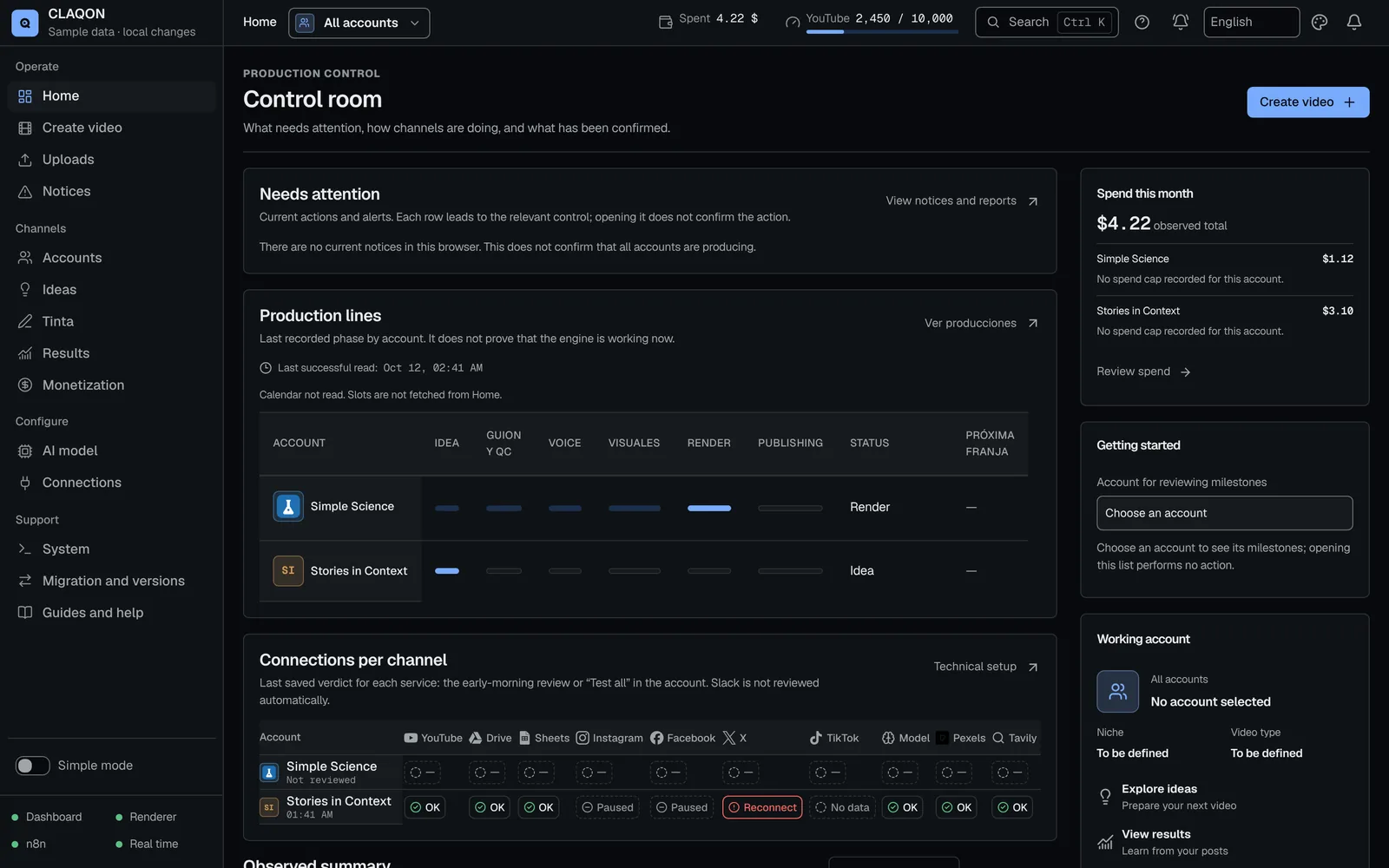
- Caps per video, per day and per month on each account, and an optional monthly cap that stops its production until the following month. The “Spend this month” card, in beta, breaks down each account’s spending by source. Spend control.
- One control room for all of them
- With the scope selector you see all the accounts or just one: what needs your attention, the production lines and the connections matrix. Each account carries its logo and colour throughout the panel. Control room.
- White label Beta
- On first start-up you can put your name in the panel’s title and header. The CLAQON symbol stays.
A typical workflow
Onboarding a new client
An example of how a channel is brought on board. The stages are the real ones; the verification timescales are set by each platform.
You create the account
With the wizard: the channel’s niche, video type, language, market and slots, plus its logo and colour so you can recognise it in the panel.
You connect its platforms
YouTube and Drive, Instagram and Facebook, and X if it publishes there, with the installation’s app or with the client’s.
You set its budget
A cap per video, per day and per month and, if you wish, a monthly cap for the account. Paid options start switched off.
You test before publishing
One production in “Check configuration” mode, which neither spends nor publishes, and another in draft to review with your client.
You run them all from one place
Each account produces in its own slots. You follow what needs attention and each account’s spending from the control room.
What you control
Each channel, with its own rules
- Each account’s content profile, language, market and slots.
- Which provider connections each channel can use.
- Budget and spend caps per account.
- Stopping an entire account, with confirmation by name, and reactivating it.
- Notifications on Slack and, if you enable them, Telegram alerts and signed webhooks to your systems.
- Encrypted backups and moving the installation to another machine.
Limits
What an agency should know today
- There is a single password-protected user per installation: no roles, no per-client permissions and no read-only access. Whoever logs in to the panel sees all the accounts.
- There is no portal for your clients. For them to review a piece, produce it in draft and share it yourself.
- The white label is in beta and changes the name, not the symbol.
- Rendering runs on the CPU and, by default, one video at a time: the number of channels you can handle is limited by your machine.
- Publishing to third parties’ channels requires passing each platform’s reviews: verifying the Google app (with an annual security assessment if it uses restricted Drive scopes), Meta’s permissions review and a paid X API plan.
- It does not publish to TikTok and has no public API.
Frequently asked questions
Common questions from agencies and studios
Can my clients or my team log in with their own user?
Not today: there is a single password-protected login per installation. If you need it, tell us in your application. If you would rather keep your clients separate, each one can have their own installation with its own licence.
How many channels fit in one installation?
Your licence sets the number of channels. In practice, the limit is set by your machine: rendering runs on the CPU, one video at a time, so it is best to stagger the slots. See pricing and licences.
Can I use my client’s Google app?
Yes. Each account can use the installation’s OAuth app or its own, always with its full client ID and secret. Credentials are stored encrypted and are not sent back to the browser.
Is there a white label?
In beta. On first start-up, you can put your own name in the panel’s title and header. The symbol stays, and changing it is not possible today.
Can I install CLAQON for my clients or resell it?
Yes, through the partner programme, which covers implementers and resellers with a distribution agreement. Tell us how many clients you work with.
Agencies and partners
Let us talk about your channels and your clients
Tell us how many channels you run and how your team works today. If it fits, we will suggest one installation with several accounts, several installations or the partner programme.