Control room and monitoring
Control room: what is happening, what is missing and what to do
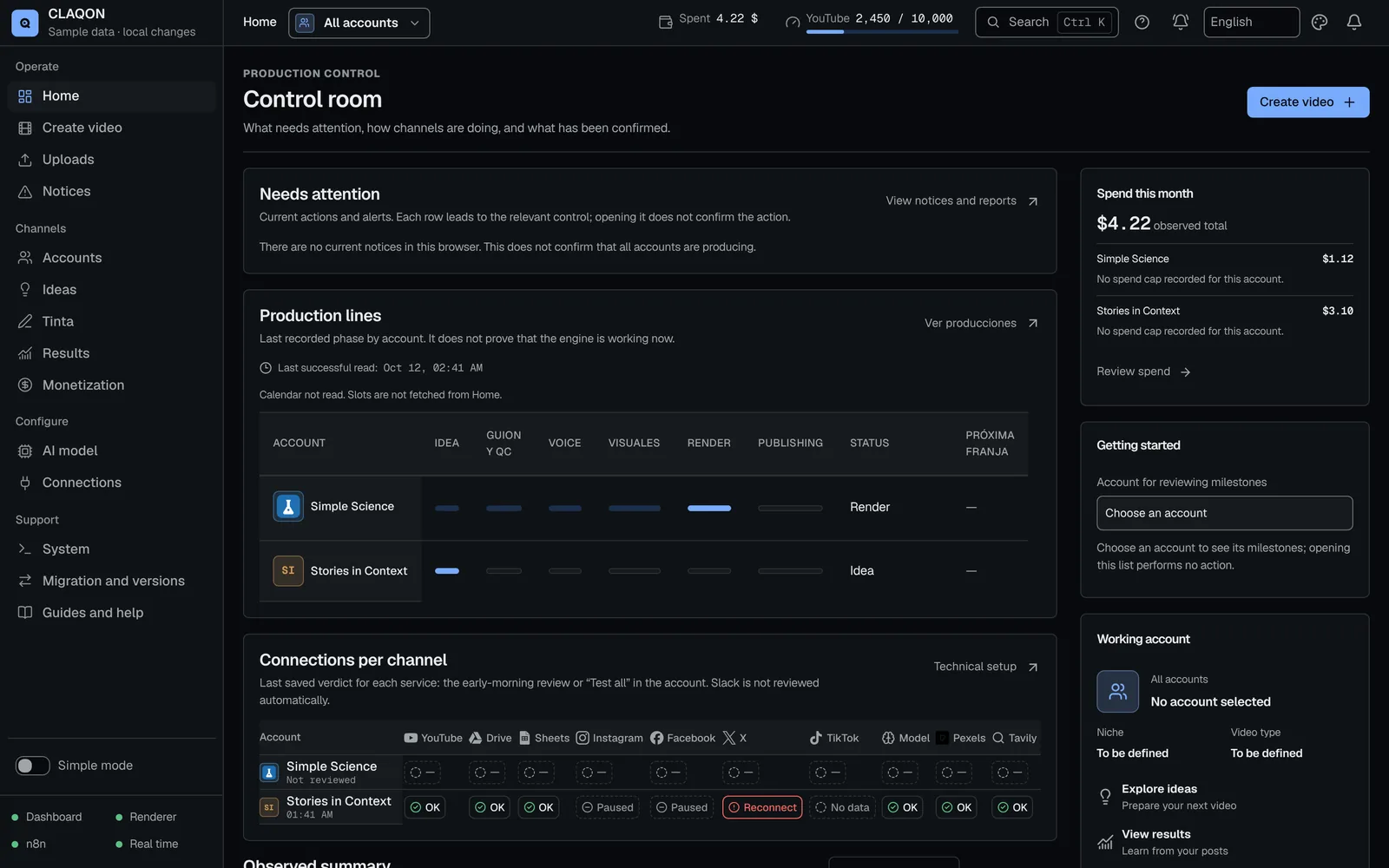
The control room is CLAQON’s home screen: it brings together what needs your attention with the exact action to take, each account’s production lines, the connections matrix and the month’s spend. When something fails, the diagnosis tells you the cause and the fix and, if you want, it alerts you via Telegram, Slack or webhooks.
- 48 types of “Required action”
- 65 causes explained with their fix
- 54 guides in Spanish, English and Portuguese
What it solves
Automation that does not fail silently
An automatic production chain touches many services: AI models, keys, quotas, connections that expire and platforms that change their rules. When something breaks, the hard part is not seeing that it failed, but knowing why and what to do.
The control room turns every problem into a specific task, with its reason, its steps and the button that fixes it. And the task closes itself once it is confirmed as resolved.
How it works
How CLAQON monitors your installation
Home tells you what to look atBeta
“Needs attention”, the production lines per account in 6 phases, the connections matrix, what was published today, the next production run and the month’s spend.
A check every night
At 04:00, or when the machine is switched on if it was off, it tests connections, renews what expires, keeps an eye on the disk and the price catalogue, and sums up what did not go out.
Every problem is an action
With the service’s logo, the reason, the steps and the exact button. It closes itself once it is confirmed.
Every failure has its cause
The diagnosis explains at which stage a piece failed and how to fix it, with no credentials in the report.
It alerts you wherever you are
Via Slack and, if you enable them, via Telegram or with signed webhooks to your own systems.
Capabilities
Notices, alerts, guides and system
- The “Control room” home Beta
- Attention, production per account, connections, observed summary, activity, the month’s spend, getting started and installation health.
- Daily check
- Connections and tokens, deferred translations, checking what was published, catalogue expiry and disk (warning below 10% or 5 GB free). It never tests Slack, which would post a real message.
- 48 types of “Required action”
- From an expired token to a key with no quota left, each with its own button and guide.
- Notices with diagnosis
- 65 causes with stage, explanation and fix; lanes by owner and a sanitised report to share.
- Telegram alerts Off by default
- Errors, high-priority actions and a daily summary; the cost of each video, if you choose. The token is stored encrypted and only travels to the Telegram API.
- Outbound webhooks Off by default
- Up to 10, with 4 events: piece ready, published, failed and pending approval. HMAC-SHA256 signature with a timestamp, 3 attempts, https only and never to a private network.
- Slack
- Two optional channels: publishing and error notices, and metrics.
- Built-in guides
- 54 guides in Spanish, English and Portuguese, plus failure guides with a diagram. Those with a guided tour offer “Do it with me”.
- Guided tours Beta
- Interactive step-by-step walkthroughs to create an account and connect YouTube.
- Ctrl K palette and scope
- The palette takes you to sections, accounts, settings, guides and open notices. The scope filters the panel by all accounts or by one.
- System
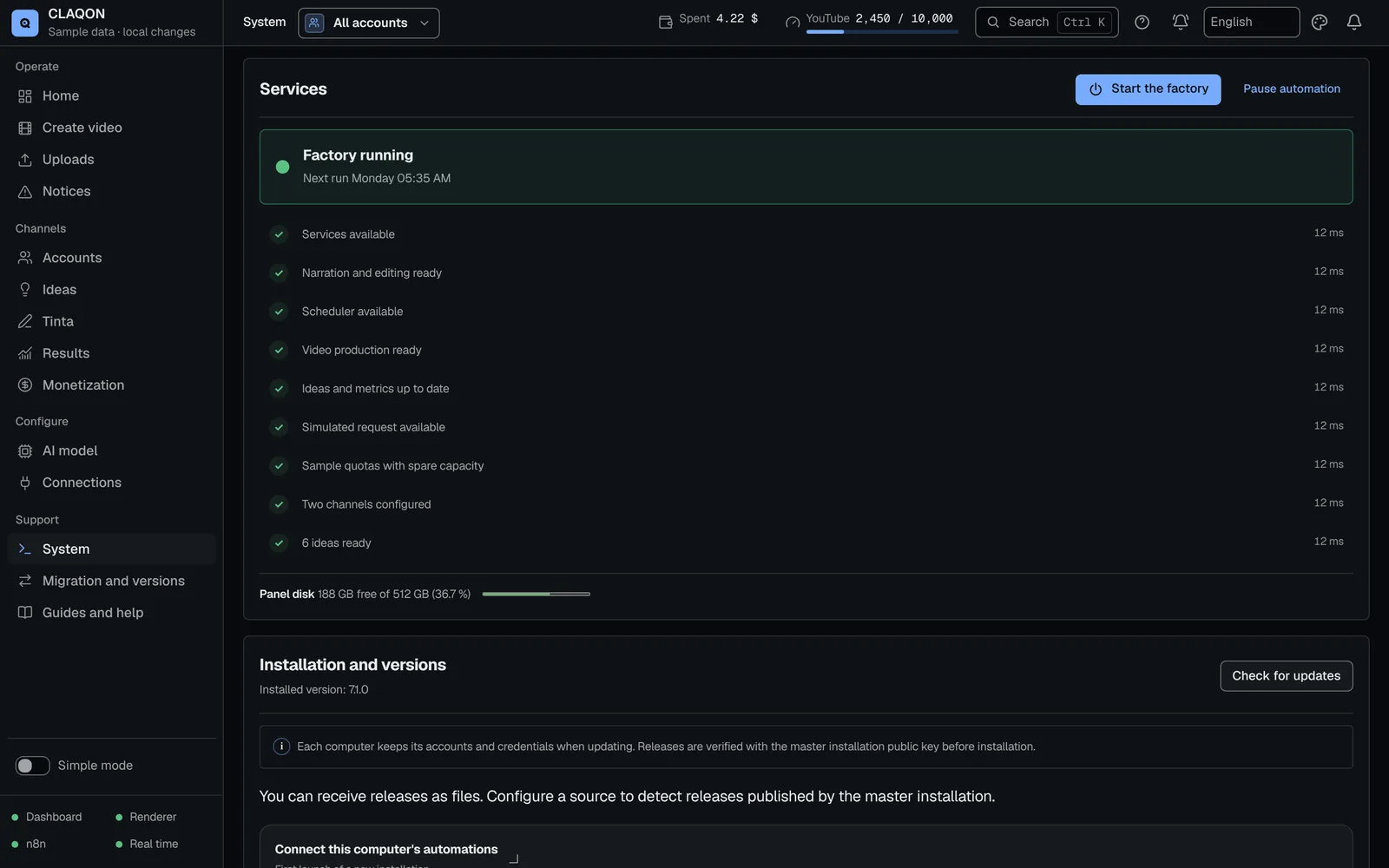
- “Start the factory”, “Pause automation”, the status of the panel, the engine and n8n, and “Check connections now”.
- Emergency exits
- “Resume the factory”, “Force unlock” and cancelling a move, also from the console when the panel is down.
Diagnosis and guides
Why a video did not go out, explained
When a piece does not go out, the panel does not stop at “error”. It tells you at which stage it failed – research, verification, script, quality control, budget, render or publishing – the probable cause and what to do, with a report you can share without exposing credentials.
The guides are in your panel’s language and open from the notices. While a backup, a restore or an update is running, the buttons that write are paused so they do not interfere with the operation.
Limits
Limits worth knowing about
- The “Control room” home and the guided tours are in beta.
- Telegram and webhooks are off until you set them up.
- There is no public API: to integrate other systems there are the outbound webhooks.
- The checks run on your machine and only while it is switched on: it is not a cloud service watching from outside.
- There is a single user per installation, with no roles or teams.
- There is no mobile app: the panel adapts to a phone screen.
Frequently asked questions
Questions about the control room
What is a “Required action”?
A task for you with the reason, the steps and the exact button: reconnect YouTube, paste a new key, renew the price catalogue… There are 48 types, and each one closes itself when CLAQON confirms that it has been resolved.
Does it alert me on my phone?
Yes, if you enable Telegram alerts or use Slack. There is no mobile app, but the panel adapts to phones.
Can I connect CLAQON to other tools?
With signed outbound webhooks: CLAQON sends the piece ready, published, failed and pending approval events to your https addresses. There is no public API.
How do I check that a webhook comes from my installation?
Each delivery carries an HMAC-SHA256 signature of the timestamp and the body, made with the webhook’s secret, which is shown only when you create it. Check the signature and reject timestamps older than 5 minutes.
What happens if a backup or an update is left half-finished?
The panel shows “An operation was left half-finished” with the step where it stopped and two ways out: “Resume the factory” and “Force unlock”. If the panel does not open, there are equivalent commands in the console. See backups and updates.
Early access
Monitor your channels from a single screen
Tell us which channels you run and what slips through the net today. We will show you how CLAQON’s control room would see it.