BetaCommentary Room
Commentary videos on authorised footage, with a rights record
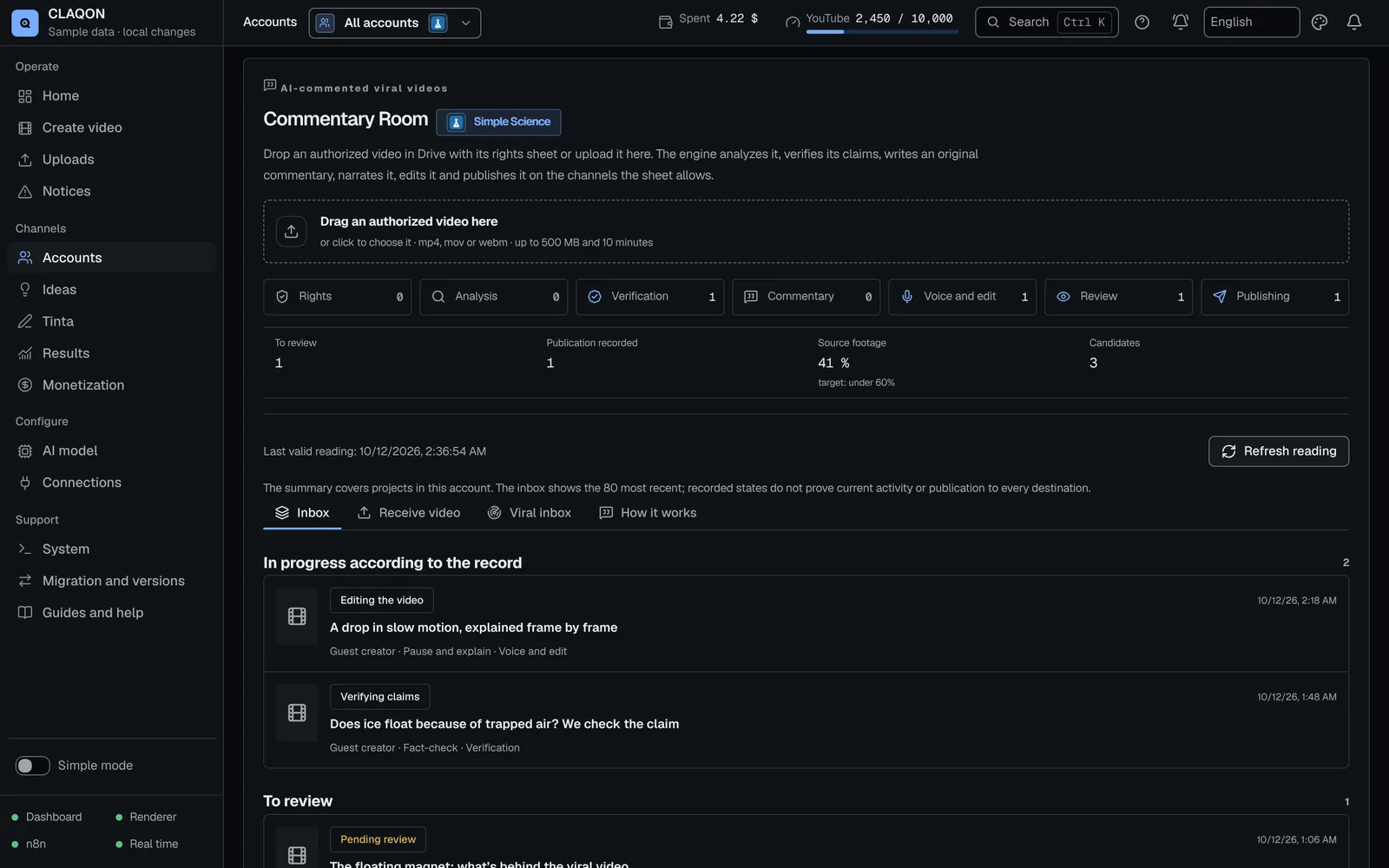
The Commentary Room turns an authorised video – your own, with written permission, licensed or from a collaborator – into a commentary video with its own analysis, verification and narration. It is not for remixing other people’s videos without permission: without a valid rights record, the project does not move forward. It is in beta and off by default.
- Mandatory rights record
- Originality gate with thresholds
- Human review on sensitive topics
What it solves
Commenting with value of your own, not reusing other people’s work
A commentary video adds something when the perspective is yours. If it only reuses someone else’s footage, platforms may treat it as reused content and the original creator has grounds to complain.
In the Commentary Room the product is your narration, your analysis and your editing; the original video is the evidence for what you are commenting on. If viewers would get the same thing by watching only the original, the project stops.
How it works
From authorised video to publication, in seven stages
Rights
You fill in the record: rights basis, authorised platforms, expiry, credit to the creator and proof of permission. Anything that does not add up is blocked here.
Analysis
On your machine: fingerprints to detect duplicates, shot changes, up to 40 frames, a contact sheet and transcription with Faster Whisper.
Verification
Checkable claims are cross-checked with up to 4 searches. Without a search key, the wording is cautious and never makes up figures.
Commentary
Your account’s AI model writes the hook, segments, conclusion and call to action. The originality gate measures how much of it is yours.
Voice and edit
Narration with Piper, or with ElevenLabs if you have it enabled. FFmpeg edits together excerpts, freeze frames with zoom, cards, the original audio turned down, the credit and karaoke captions.
Review
You approve it from the panel. On sensitive topics, human review is mandatory.
Publishing
On YouTube, Instagram, Facebook or X, only where the record authorises it and while it remains valid.
Capabilities
What the Commentary Room checks before publishing
- Six rights bases
- Own content, written permission, licence, collaborator form, native platform remix and public domain. Except for own content and remixes, proof of permission is mandatory.
- Record blocks
- A missing or expired record, no proof, an unknown creator, required credit with no text, minors in the video, no permission to edit, narrate or monetise, or an unauthorised account.
- Originality gate
Source footage of up to 60% and narration of at least 40%, with 40 words or more and at least one pause or card.
Overlap with the original transcript of up to 35%, no merely descriptive sentences, and figures only if they are backed up.
Length between 0.7 and 1.35 times the target.
- Mandatory human review
- Minors, health, finance, politics, violence, personal data, copyrighted music, high risk or an attempt to slip instructions into the material.
- Duplicates
- The same file (SHA-256) or a perceptual similarity of 0.85 or more stops the project.
- Cost per project
- Analysis, Piper and FFmpeg cost nothing per use. The AI model makes 2 or 3 calls and Tavily up to 4 searches. The known cost is compared with the account’s per-video cap; anything unknown is declared unknown, not estimated.
- Candidate inbox
- A daily YouTube scout brings in metadata only, with deterministic priority, “Evaluate with AI” on demand and a message to ask the creator for permission.
- Disclosure on YouTube
- The video is uploaded with the synthetic content disclosure switched on.
- Automatic approval Off by default
- It only approves on its own when no review is mandatory.
- Loudness for social media Off by default
- Normalises the edit to −14 LUFS.
Limits
Limits worth knowing about
- It is in beta and off by default. Its workflows were validated without running them: the first real run is still to be checked.
- The record holds what you declare and the proof you attach. CLAQON checks that it is complete and in force, not its legal validity.
- There is no automatic intake from TikTok or Instagram: you upload the video yourself or a collaborator sends it to you.
- Rendering runs on the CPU, one at a time: a 10-minute video can take several minutes just to transcribe.
- The scout uses YouTube Data quota: each search costs 100 units.
- An approved edit that is not published within 72 hours has to be rendered again.
- It does not publish to TikTok, even if the record authorises it.
- YouTube keeps videos uploaded through the API private until your Google project passes its audit.
Frequently asked questions
Questions about the Commentary Room
Can I comment on any viral YouTube video?
No. The room only works with authorised video: your own, with written permission, licensed, from a collaborator, from the platform’s native remix or in the public domain. The candidate scout helps you find videos and ask for permission, but it never downloads them.
What happens if the permission expires?
The record carries an expiry date, and an expired permission stops the project. At publishing time it checks again that the platform is authorised and that the permission is still valid.
How do I ask the creator for permission?
From the candidate inbox, “Request permission” generates the message. When they reply, “Record permission” files the reply in the record. If the video is yours, you mark it with “It’s mine”.
How much does each commentary video cost?
Analysis, local voice and editing cost nothing per use. The spending comes from the AI model (2 or 3 calls) and Tavily (up to 4 searches), with your keys, and from ElevenLabs if you enable it. Before narrating, the room compares the known cost with the account’s per-video cap. See spend control.
Does it detect whether I have already used that video?
Yes. It compares the file’s SHA-256 fingerprint and a perceptual fingerprint per second. With the same file or a similarity of 0.85 or more, the project stops as a duplicate.
Early access
Comment with permission and with your own judgement
If your channel comments on other creators’ videos, tell us how you get permissions today. We will tell you whether the Commentary Room fits in its current state.