Features
CLAQON features to produce, publish and control your channels
These are the CLAQON features, ordered the way you work: produce each piece with its sources, publish it to your platforms and control what it spends and what it records. Each one shows its real status: stable, beta or off by default.
- Every claim with its source
- Spend caps per video, day and month
- Installed on your machine or server
From topic to edited video
Produce
The shorts factory and what feeds it: verified research, voice and visuals, the AI model that writes, and the rooms for editing and captioning your own footage.
- Shorts factoryThe full 18-stage workflow for vertical shorts and long videos, per account and in its slots.
- Source verificationSource-based research, verbatim evidence and a deterministic check that rejects unsupported figures and absolutes.
- Voice and visualsLocal narration or ElevenLabs, licensed stock clips, optional AI images and video, CC0 music and sound effects.
- AI modelsChoose from 10 preconfigured providers, including a local one, or any compatible endpoint, with alternatives and a fallback.
- Editing StudioBetaAn in-browser editor with a timeline, 21 transitions, layers, picture-in-picture with chroma key and karaoke captions.
- Captions and shortsBetaKaraoke captions on your own footage with local transcription, and vertical shorts from a long video of your own.
From your machine to your platforms
Publish
Your videos on YouTube, Instagram, Facebook and X, each at its own time; your own videos from Drive; text on social platforms; and the commentary, stream clip and character lines, all in beta.
- Multi-platform publishingYouTube, Instagram Reels, Facebook Reels and X, with slot scheduling, YouTube quota monitoring and an alert before a connection expires.
- Direct publishingBetaDrop your videos in Drive and they go out on schedule, with optional editing, text for each platform and automatic or manual approval.
- TintaBetaText posts and threads on eight networks, with a counter per network and X always subject to your confirmation.
- Commentary RoomBetaOriginal commentary on authorised video, with a mandatory rights record and an originality gate.
- Stream clipsBetaExisting Twitch or Kick clips, made vertical with captions and zone framing, and logged in your sheet.
- AI charactersBetaDialogue videos with fictional characters, lip sync and the cost in view before anything is spent.
What happens and what it costs
Control
What each piece spends, what it contains, what needs your attention and what each account learns, plus several accounts in one installation, backups and updates.
- Spend controlNo credits: caps per video, day and month, a quote and a reservation before spending, and a log of every entry.
- Compliance recordProvenance record, synthetic content disclosure, similarity check, real-people guard and the rules of each platform.
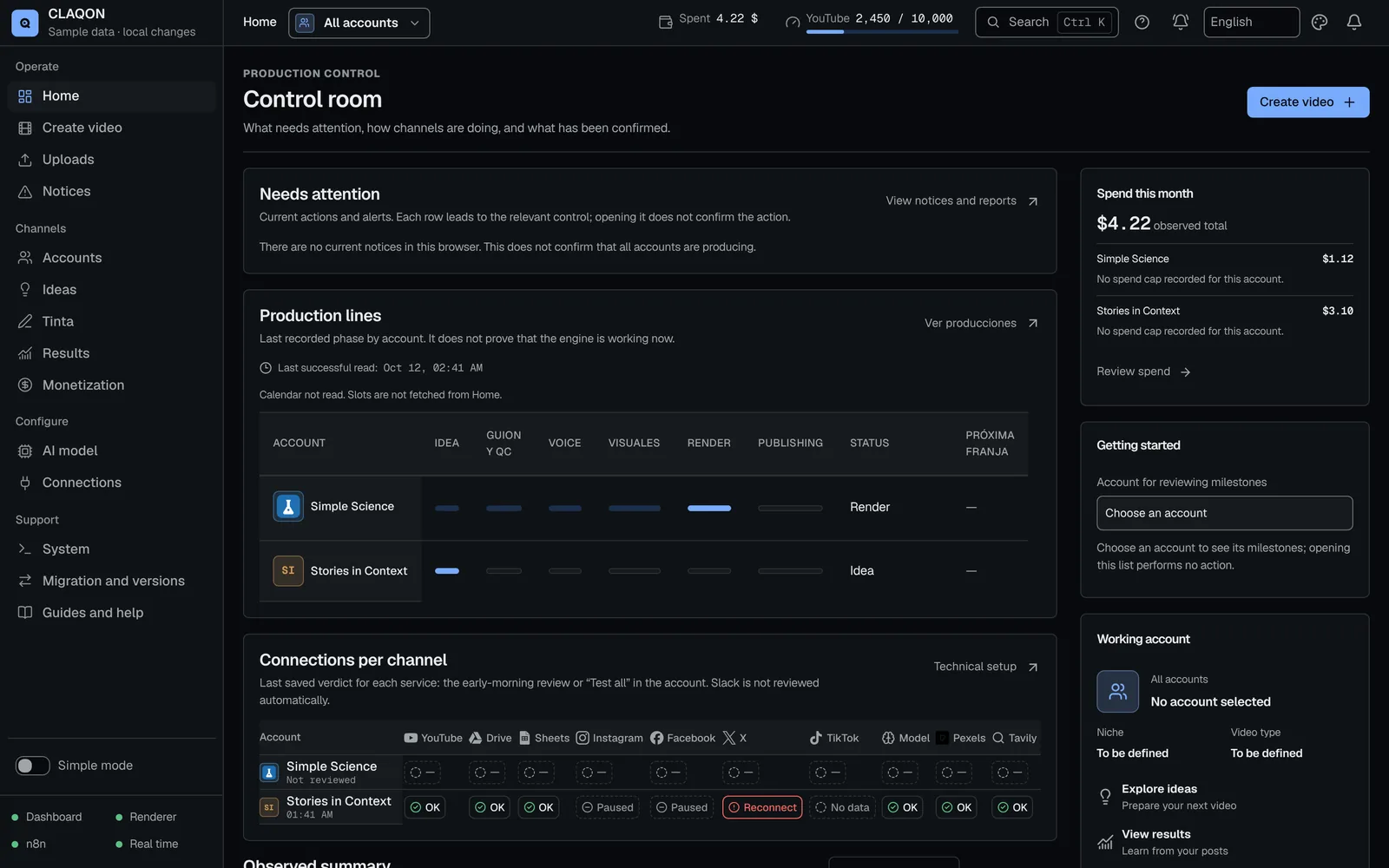
- Control roomWhat needs your attention, why each piece failed and what to do, with alerts, guides and emergency exits.
- Analytics and learningYouTube metrics, learning with a minimum sample and continuous improvement of safe levers, with safeguards and rollback.
- Multi-account & white labelSeveral channels per installation, each with its own profile, market, language, budget and connections, plus a white label.
- Backups and updatesBackups encrypted by default, moving between machines, signed updates with rollback and emergency exits.
Status of each feature
What is ready and what is in beta?
We would rather tell you before you find out for yourself. This table sums up the status of each feature and what is worth knowing about it.
| Feature | Status | Worth knowing |
|---|---|---|
| Shorts factory | Stable | Long-form video and promotion to long-form, in beta. AI director and key shots with AI video, off by default. |
| Source verification | Stable | It rejects anything without support, but it does not guarantee the absence of errors. |
| Voice and visuals | Stable | Local voice and stock by default. ElevenLabs, AI images and AI video, off by default. |
| AI models | Stable | Signed live catalogue, in beta. The quality of local models has not been measured. |
| Editing Studio | Beta | The tools added on 3 October, pending verification with real footage. |
| Captions and shorts | Beta | “Shorts from a long video”, pending verification with real footage. |
| Multi-platform publishing | Stable | Post-publication check over 7 days, in beta. TikTok, disabled. |
| Direct publishing | Beta off by default | Pending verification with real footage. Simple mode, also in beta. |
| Tinta | Beta off by default | Text on eight platforms. X, always with your confirmation. |
| Commentary Room | Beta off by default | The first real run of its workflows has yet to be checked. |
| Stream clips | Beta off by default | Twitch and Kick clips, pending verification with real footage. |
| AI characters | Beta off by default | Nothing is spent without your confirmation; prices pending verification. |
| Spend control | Stable | Single spend log, “Spend this month” and “Paid options”, in beta. Monthly cap per account, off by default. |
| Compliance record | Stable | These are separate parts: a single compliance record per piece does not exist yet. No C2PA or XMP marking. |
| Control room | Stable | The home screen, in beta. Alerts via Telegram and signed webhooks, off by default. |
| Analytics and learning | Stable | Automatic metrics from YouTube only. Continuous improvement and trends, in beta; Meta metrics, off by default. |
| Multi-account and white label | Stable | White label, in beta. |
| Backups and updates | Stable | Encrypted backups and moving between machines, stable. Scheduled backups, restore, signed updates and installers, in beta. |
Statuses checked against the product code on 11 October 2026. “Stable” describes how it works, not audience results.
What it does not do yet
What CLAQON does not do today
If any of these is essential for you, CLAQON is not the right tool for you yet.
- Publish to TikTok: it is disabled until the app has been audited.
- Multiple users with roles: there is a single login per installation.
- Render on the GPU or in parallel: it renders on the CPU, one video at a time by default.
- Offer a public API: there is only an internal API and outbound webhooks.
- Reframe based on faces, dub videos or clone voices.
- Work without installation or keys: it is installed on your machine or server and uses your own keys.
- Publish publicly on YouTube through the API before your Google project has passed the audit.
- Produce with the machine switched off: it only works while the machine is on.
Early access
Try these features with your own channels
We are opening an early access programme for operators of informational channels. Tell us what you produce today and we will tell you which features fit your case.