Self-hosted software for video channels
Automate your informational shorts without cutting corners on sources.
CLAQON researches, checks every figure against its source, writes, narrates, edits and publishes to YouTube, Instagram, Facebook and X from your own machine. With a spend cap per video, per day and per month, and no credits.
- Every claim with its source
- You pay each provider with your own keys
- Your data, on your machine
Why CLAQON
Three promises you can verify
Platforms penalise mass-produced content that adds nothing, and the market complains about credits wasted on failures. CLAQON responds with process, not with promises about audiences.
Every claim carries its source
Before writing, CLAQON researches with citable sources or with yours. The script can only rely on verbatim excerpts, and a deterministic check rejects figures and absolutes that are not in the evidence.
Every piece leaves a trail
A provenance record with licences and providers, a synthetic content disclosure on YouTube, a similarity check against the account’s previous 30 pieces and a real-people guard.
You pay for what you use, with a cap
No credits: you pay each provider with your own keys. A cap per video, per day and per month, a reservation before spending and a log of every entry in the “Spend this month” card.
The full workflow
From idea to learning, in 18 stages
Each account produces in its own slots, following the same path. If a stage fails, the piece stops before spending on the next one and the panel tells you why.
Plan
The account decides what to produce next and with which profile.
Trigger
Produces in the account’s slots (up to 4 a day), through its own webhook or with “Create video” from the panel.
Claim idea
Takes the next idea from the account’s queue and avoids duplicates.
Resolve profile
Applies niche, video type, format, length, market, language and destinations. An idempotency key prevents the same piece from being produced twice.
Research
The evidence comes before a single line is written.
Reserve keys
Reserves the API key with the most headroom and pauses keys that are rejected or out of quota.
Research
Searches for citable sources or uses the URLs you provide, with no search cost.
Verify claims
Only accepts verbatim excerpts from the source, on topic and of valid length. Anything rejected cannot be cited.
Score the opportunity
A deterministic score that penalises “easy money”, casino or betting angles. It passes at 60 or above.
Write
The AI model you choose writes; the deterministic check decides.
Script and creative
Scenes, hook, titles and descriptions, with a main model, up to 4 alternative models and 2 to 5 attempts.
HARD QC
The script needs 100/100 to move on. If it fails, a targeted repair runs; if that does not fix it, it goes to human review before anything is spent on voice or visuals.
Produce
Voice, scenes and editing, on your machine.
Voice
Local narration (Piper or Kokoro) with word-by-word timing for the captions. ElevenLabs, if you enable it.
Scenes
A scene-by-scene plan fitted to the real timing of the narration.
Key shotsOff by default
In hybrid mode, picks 1 to 8 key scenes for an AI video clip. Off by default.
Stock clips
Licensed vertical stock clips, filtered and scored, without repeating any used in the last 45 days.
Render
Editing with FFmpeg on your machine, with dynamic captions, music chosen by tone and effects.
Publish
It goes out in its slot and is logged.
Publish
YouTube (Shorts and long-form), Instagram Reels, Facebook Reels and X. Before uploading, the format limits for X and Instagram are checked.
Log
Every job records its reservation, outcome, reason and costs in an idempotent log.
Notification
Notifies you on Slack and, if you enable them, on Telegram or through signed webhooks.
Learn
What is published feeds what comes next, within limits.
Analytics and learning
Every day it collects YouTube metrics, recalculates the account’s learning and prepares new ideas. Learning adjusts; it does not impose.
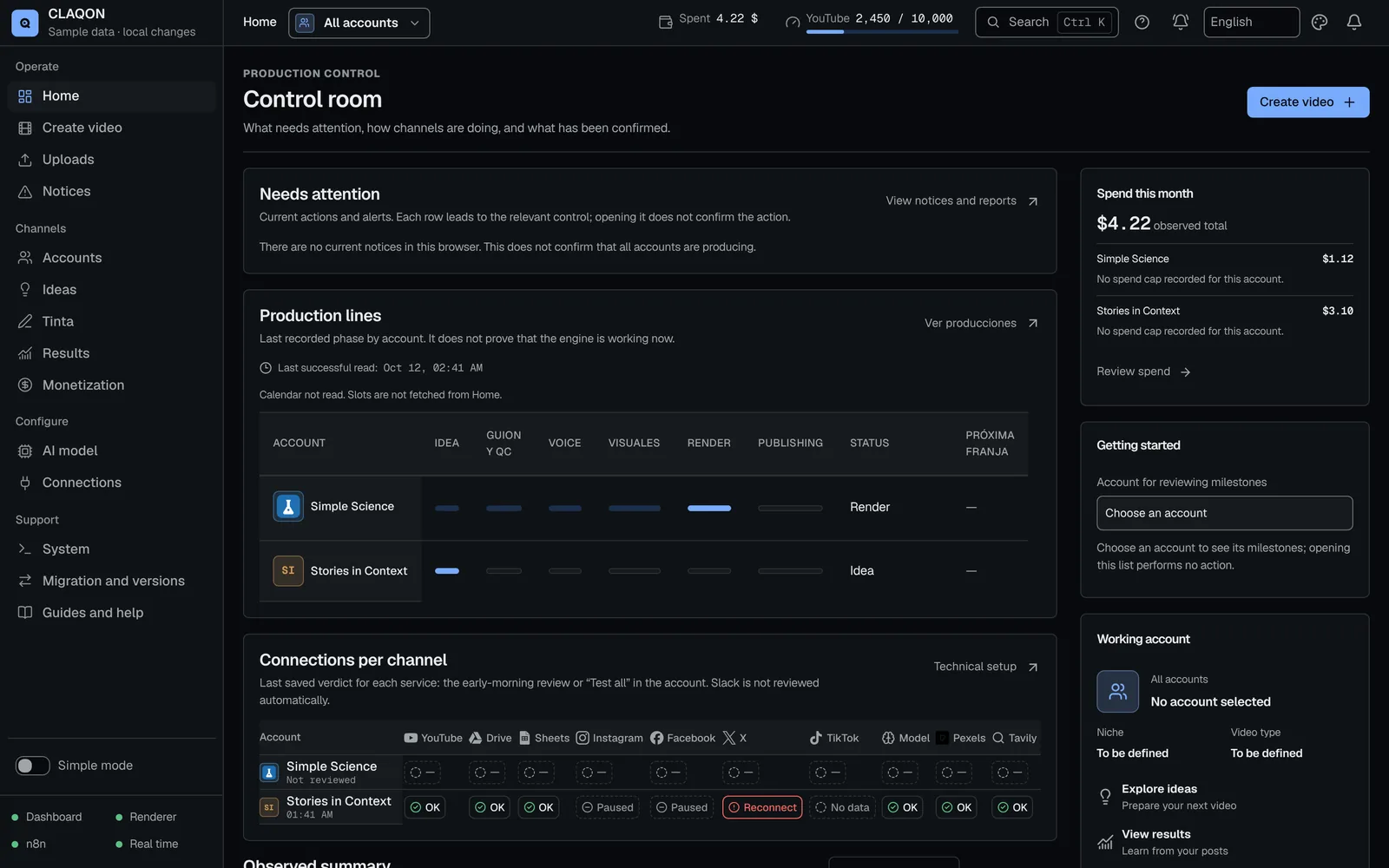
Control room
You know what is happening, what is missing and what it costs
The home screen is a control room: what needs your attention and the exact action to take, each account’s production lines, the connections matrix and the month’s spend.
When something fails, the diagnosis explains it with one of its 65 documented causes and the fix. The daily check tests connections, renews what expires, keeps an eye on the disk and sums up what did not go out.
- 48 types of “Required action”, each with its own button
- Alerts via Telegram and signed webhooks, if you enable them
- Guides in Spanish, English and Portuguese, with “Do it with me”
Integrations
Publish where your audience is, with the model you choose
Video
- YouTube
- X
Text with Tinta (beta)
- Threads
- Bluesky
- Mastodon
- Telegram
AI models
- Anthropic
- Google Gemini
- OpenAI
- Mistral AI
- DeepSeek
- OpenRouter
- Ollama
- xAI
- Groq
- Together AI
Media and services
- Pexels
- ElevenLabs
- fal.ai
- Google Drive
- Google Sheets
- FFmpeg
- Docker
Product facts
Figures from the code, not from marketing
What CLAQON does today, counted from its own code on 12 October 2026.
- stages, from idea to learning
- 18
- preconfigured AI providers
- 10
- including a local one, plus any compatible endpoint
- video and text platforms
- 4 + 8
- text with Tinta, in beta
- translated caption languages on YouTube
- 6
- in addition to the original
- markets with local slots
- 12
- causes explained in the diagnosis
- 65
Product lines
One installation, several ways to produce
Shorts factory
The full 18-stage workflow for vertical shorts and long videos, per account and in its slots.
Direct publishingBeta
Drop your videos in Drive and they go out on schedule, with text for each platform and automatic or manual approval.
Editing StudioBeta
An in-browser editor with a timeline, 21 transitions, PiP with chroma key and karaoke captions.
Captions and shortsBeta
Karaoke captions on your own footage and shorts cut from a long video of your own.
Commentary RoomBeta
Commentary on authorised video, with a rights record and an originality gate.
TintaBeta
Text posts and threads on eight platforms, with X always subject to your confirmation.
Sovereignty
Your machine, your keys, your data
Secrets encrypted at rest
Account and provider credentials are stored encrypted with AES-256-GCM and are never sent back to the browser.
Safe outbound network
Downloads and outbound calls reject private addresses, pin the resolved IP and limit size and time.
Encrypted backups and signed updates
Backups with AES-256-GCM, moving between machines, and updates signed with Ed25519, with rollback.
Fit
Who it is for, and who it is not for yet
It is for you if…
- You run 1 to 5 informational channels: business, technology, business history or education.
- You publish on YouTube, Instagram and Facebook, and want to do it rigorously.
- You are concerned about the platforms’ inauthentic content policy.
- You have paid for credits that were wasted on failures and want a real cap.
- You prefer your data and your keys to stay on your machine.
- You invoice as a professional or a business.
It is not for you yet if…
- Your channel lives on TikTok: CLAQON does not publish there today.
- You need several users with roles: there is a single login per installation.
- You are looking for photorealistic avatars, dubbing or voice cloning.
- You want to sign up in the cloud in a minute without installing anything.
- You are looking for “passive income”: CLAQON is a work tool.
Licence
An annual licence per installation, with no credits
You pay for the CLAQON licence and, separately, for what your providers consume with your own keys, at their prices. The done-for-you setup is invoiced separately.
Annual licence
Signed updates, new generators and email support. If you do not renew, you keep the installed version.
Done-for-you setup
Machine, Docker, Google and Meta connections, keys and your first video, with a person on the other end.
Providers at cost
AI model, voice, image or video: you pay each provider directly. You can produce with local voices and models.
Frequently asked questions
What people usually ask us
What exactly is CLAQON?
Software that you install on your machine (Windows or Linux, with Docker) or on a server in your name. It produces short and long videos for your channels through an 18-stage workflow – research, verification, script, quality control, voice, editing, publishing and learning – and lets you see and control every step and every cost.
Does it guarantee views, subscribers or income?
No. Nobody can honestly guarantee that. CLAQON guarantees the process: that every piece goes through the same checks, that figures are backed by their source and that spending does not exceed the caps you set.
How much does each video cost to produce?
It depends on what you enable. With local voices, free stock clips and rendering on your machine, the cost per video can be close to zero; the AI model for the script is usually a small part of the spend. If you enable paid voice, image or video, CLAQON shows you the estimated cost before spending and stops it at your caps. See how it controls spending.
Does it publish to TikTok?
Not today. The code exists, but publishing to TikTok is disabled until the app audit has been completed. It publishes to YouTube, Instagram, Facebook and X, and to eight text platforms with Tinta (beta).
Where are my data and my videos stored?
On your machine or on your server. Keys are stored encrypted and backups are encrypted by default. CLAQON does not need a cloud of its own to work: it talks directly to your providers and to the platforms.
When can I start?
We are opening an early access programme for channel operators in Spain and Mexico, with limited places because each installation is closely supported. Apply for a place and we will tell you whether it fits your case.
Early access
Apply for a place in the early access programme
Tell us which channels you run and what it costs you to produce them today. We will reply with a proposal or with an honest “not yet”.