Use case · Informational channels
Shorts for informational channels, with every fact tied to its source.
If your informational channel explains current affairs, science or topics of general interest, CLAQON researches, checks every figure against its source, edits and publishes in your slots. With a spend cap and from your own machine.
The challenge
Publishing often without publishing mistakes
A news explainer channel lives on two things: frequency and trust. Publishing several pieces a week means researching, writing, narrating and editing without letting a made-up figure, a wrong date or a claim that no source supports slip through.
Tools that turn a topic into a video usually leave the checking to you, and platforms penalise repetitive or mass-produced content that adds nothing of its own. On top of that, every failed attempt with a paid provider is charged all the same.
How CLAQON solves it
Evidence first, script second
Every piece goes through the same 18-stage workflow. These are the stages that matter most to an informational channel.
Research before writing
CLAQON searches for citable sources with your search key. In the productions you launch from the panel, you can also paste your own URLs: they are fetched through the safe network, the paid search is skipped and the script cites your links.
Only verbatim excerpts, and HARD QC
A claim only gets in if its excerpt appears word for word in the source and is on topic. The deterministic HARD QC check requires 100/100: it rejects figures outside the evidence and unsupported absolutes and, if the repair is not enough, holds the script for review before spending on voice.
Daily trendsBeta
Once a day, CLAQON gathers what is most watched on YouTube, search interest in the niche and the week’s news, scores each topic from 0 to 100 and suggests ideas that can be verified with public sources.
A trail for every piece
A provenance record with licences and providers, a synthetic content disclosure on YouTube when there are generated scenes, and a check that compares each piece with the account’s previous 30 to warn you if you are repeating yourself.
A typical workflow
A day on a news explainer channel
This is an example to help you follow the process. The stages are the real ones; the topics, slots and providers depend on your account.
Ideas arrive in the queue
You add topics by hand or from your Google Sheet, and the daily trends can add suggestions from the account’s niche.
Daily trends are in beta.
The slot triggers production
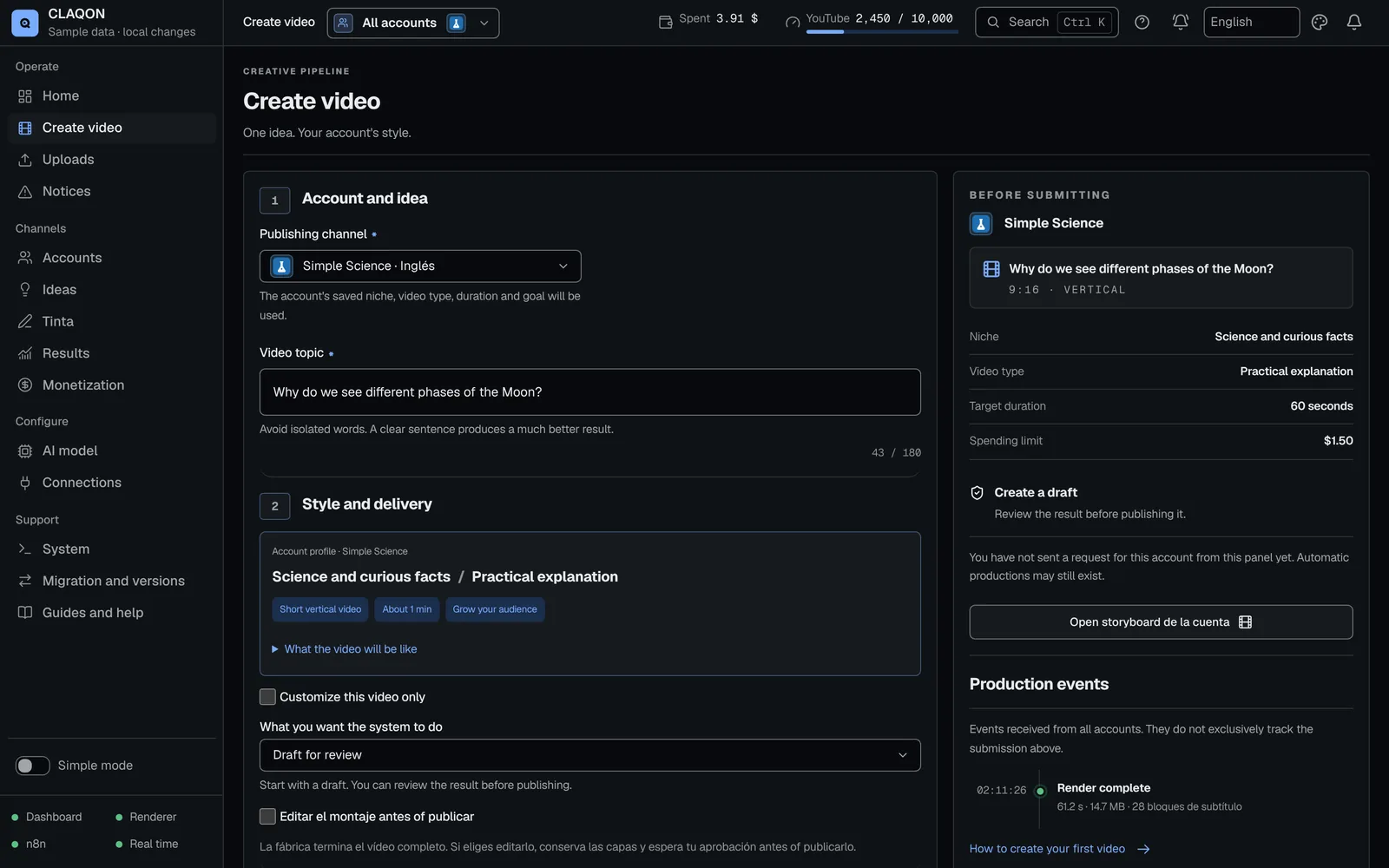
At the account’s scheduled time, CLAQON takes the next idea, avoids duplicates and applies the profile: video type, format, length, market and language.
Research and verification
It gathers the sources and keeps only the verbatim excerpts that support the topic. Anything rejected cannot be cited.
A checked script
The AI model you choose writes the script; HARD QC approves it, repairs it or stops it before anything is spent on voice and visuals.
Voice, editing and publishing
Narration with word-level timing, stock clips that are not repeated within 45 days, rendering on your machine and publishing to the account’s platforms. The cost is logged.
What you control
Editorial decisions are still yours
- Niche and video type: practical explanation, annotated list, comparison or case study.
- The account’s editorial approach, in up to 1,200 characters.
- Market, language and up to 4 slots a day, at least 90 minutes apart.
- Sources: search with your key, or your own URLs in manual productions.
- AI model, from 10 preconfigured providers, including a local one.
- Spend caps per video, per day and per month.
- Launch mode: check the configuration, create a draft, or create and publish.
- Stopping the whole account whenever you need to, with confirmation by name.
Limits
What CLAQON does not do for an informational channel
- It does not cover breaking news minute by minute: it produces in scheduled slots and only while the machine is switched on.
- The check rejects figures without evidence, but it does not ensure there are no errors. Review sensitive topics in draft mode before publishing.
- Rigour has a price: if the sources do not support the topic, the piece stops instead of going out.
- Stock clips illustrate rather than document: they are not footage of the event you are reporting on.
- The search for citable sources uses your key for a search provider, which is a paid service, unless you provide your own URLs.
- TikTok is not available, and YouTube keeps videos uploaded through the API private until your Google project passes its audit.
Frequently asked questions
Common questions from informational channels
Where does CLAQON get its sources from?
From a search for citable sources run with your own key, or from the URLs you provide in a production launched from the panel. In both cases, the script can only rely on excerpts that appear verbatim in the source. This is how verification works.
Does CLAQON ensure that a video has no errors?
No. It rejects figures that are not in the evidence, unsupported absolutes and claims without a source, but no automatic check replaces your editorial judgement. For delicate topics, produce in draft mode, review the piece and publish it by hand.
Is it suitable for breaking news?
It is not designed for that. CLAQON produces in each account’s slots, with its research and its checks, and it depends on your machine being switched on. It is a better fit for explained current affairs: the week’s topics, told with context and sources.
How do I stop my videos from looking mass-produced?
CLAQON helps, but it does not solve it for you. It lets you define an editorial approach of your own for the account, does not repeat stock clips used in the last 45 days and measures how similar each piece is to the previous 30, although it only warns you. Read the guide on inauthentic content.
Early access
Produce explained current affairs with sources, on your machine
Tell us which informational channels you run and how you produce them today. We will reply with a proposal or with a reasoned “not yet”.